
發票管理
用於管理銷售時開具的發票。
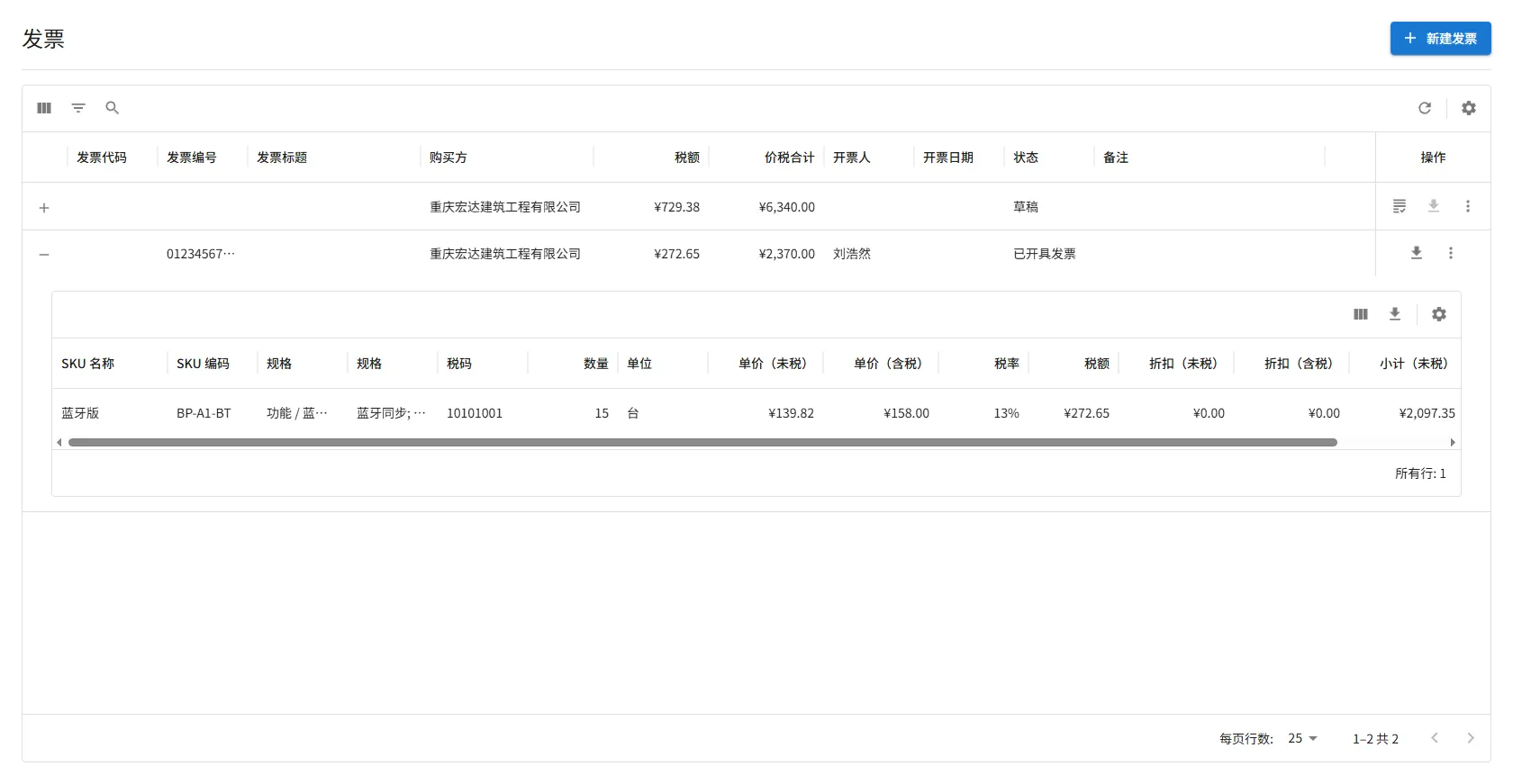
- $icon[Add]:新建發票;發票行內的為展開發票明細
- $icon[Grading]:更新發票資訊,主要在發票開具後上傳原件資料
- $icon[ViewColumn]:控制發票明細顯示、隱藏欄位
- $icon[Download]:導出發票明細,可以用於稅控系統開票
為報價單、契約開具發票。
表單欄位說明
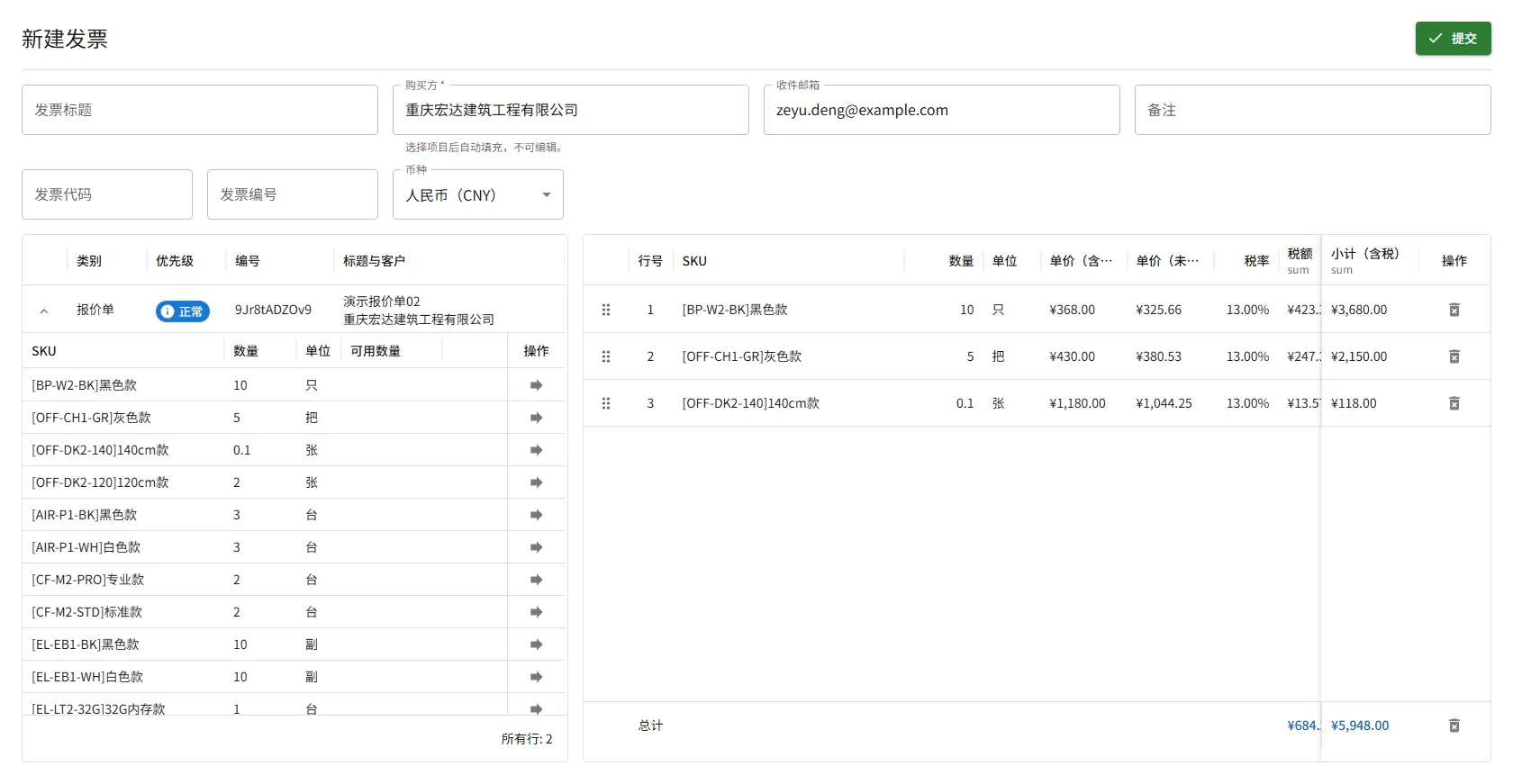
Section titled “表單欄位說明”- 發票標題:用於標識和區分發票的標題資訊
- 購買方、收件箱:發票接收者資料,不可編輯
- 備註:將在發票中顯示的備註資訊,可根據實際情況填寫
- 發票代碼、發票編碼:可在發票正式開具後補充或更新,用於記錄發票的唯一標識資訊
位於表單欄位下方的 左側區域,展示所有 等待開具發票 的報價單與契約。
點擊列表中任意一行的 $icon[ExpandMore] 按鈕,可展開查看該單據下 尚未開票的產品列表。
操作限制
- 當您選擇一份待開票的報價單或契約後,系統會鎖定客戶資料,只能選擇 同一客戶 的報價單或契約,以確保開票對象一致。
- 清空發票清單後限制解除。
位於表單欄位下方的 右側區域。
發票清單只能通過 從左側“待開票列表”中選取項目 的方式加入,無法直接在此區域新增內容。
報價單與契約中的每個項目僅能被開具一次發票。
系統支持對整份或多份報價單或契約進行 拆分開票 或 合併開票,以適應不同客戶的開票習慣。但需要注意的是:
- 系統不支持將同一個項目拆分為多次開票。
- 每個項目在第一次開票後,即視為已完成開票,不可再次對其開票。
當發票成功開具後,您需要上傳 發票原始的 XML 文件 以及 PDF 文件 進行留檔,便於後續查詢、對帳與審計。
由於稅控系統在計算稅額時可能與系統計算的金額不完全一致的情況,需要您根據實際金額進行必要的 稅額與合計金額修正。
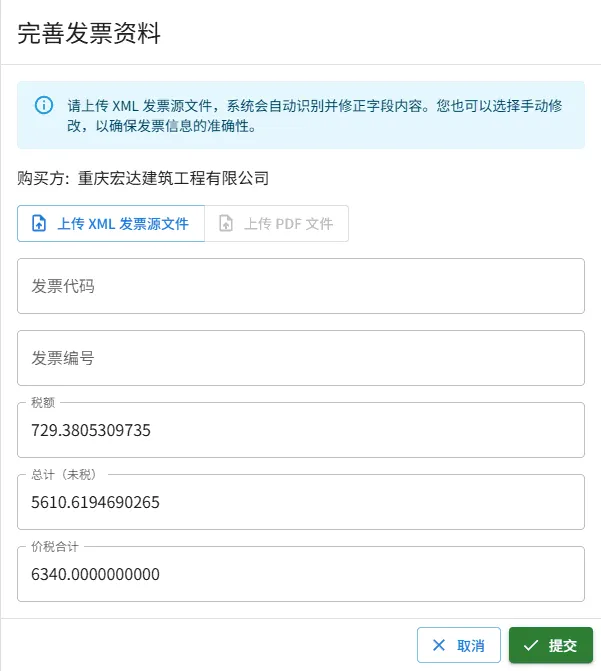
XML 發票源文件
Section titled “XML 發票源文件”此文件包含發票原始數據,包括但不限於:詳細清單、稅務局資訊、購銷雙方資訊、加密資訊等等。
文件可以使用 記事本 一類的文本編輯軟體打開,內部數據範例:
<?xml version="1.0" encoding="utf-8" standalone="yes"?><EInvoice> <Header> <EIid>01234567890123456789</EIid> <EInvoiceTag>XXXXXXXX</EInvoiceTag> <Version>0.31</Version> <InherentLabel> <InIssuType> <LabelCode>Y</LabelCode> <LabelName>是否藍字發票標誌</LabelName> </InIssuType> <EInvoiceType> <LabelCode>01</LabelCode> <LabelName>電子發票</LabelName> </EInvoiceType> <GeneralOrSpecialVAT> <LabelCode>01</LabelCode> <LabelName>增值稅專用發票</LabelName> </GeneralOrSpecialVAT> <TaxpayerType> <LabelCode>3</LabelCode> <LabelName>轉登記小規模納稅人</LabelName> </TaxpayerType> </InherentLabel> <UndefinedLabel> <Label> <LabelType>發票開具方式標籤</LabelType> <LabelCode>1</LabelCode> <LabelName>網頁開票</LabelName> </Label> </UndefinedLabel> </Header> <EInvoiceData> <SellerInformation> <SellerIdNum>012345678901234567</SellerIdNum> <SellerName>擎閩XXXXXXX有限公司</SellerName> <SellerAddr>上海市XXXXXXXXXXXXXXX</SellerAddr> <SellerTelNum>22813685</SellerTelNum> <SellerBankName>招商銀行股份有限公司上海XX支行</SellerBankName> <SellerBankAccNum>012345678901234</SellerBankAccNum> </SellerInformation> <BuyerInformation> <BuyerIdNum>012345678901234567</BuyerIdNum> <BuyerName>重慶宏達建築工程有限公司</BuyerName> </BuyerInformation> <BasicInformation> <TotalAmWithoutTax>2097.35</TotalAmWithoutTax> <TotalTaxAm>272.65</TotalTaxAm> <TotalTax-includedAmount>2370.00</TotalTax-includedAmount> <TotalTax-includedAmountInChinese>壹萬陸仟圓整</TotalTax-includedAmountInChinese> <Drawer>張三</Drawer> <RequestTime>2024-01-24 16:23:48</RequestTime> </BasicInformation> <IssuItemInformation> <ItemName>*資訊技術服務*資訊技術服務</ItemName> <MeaUnits>月</MeaUnits> <Quantity>1</Quantity> <UnPrice>15841.5841584158</UnPrice> <Amount>15841.58</Amount> <TaxRate>0.01</TaxRate> <ComTaxAm>158.42</ComTaxAm> <TotaltaxIncludedAmount>16000.00</TotaltaxIncludedAmount> <TaxClassificationCode>0000000000000000000</TaxClassificationCode> </IssuItemInformation> <SpecificInformation /> <AdditionalInformation /> </EInvoiceData> <SellerAuthentication> <AuthenticationMethods>01</AuthenticationMethods> </SellerAuthentication> <TaxSupervisionInfo> <InvoiceNumber>01234567890123456789</InvoiceNumber> <IssueTime>2024-01-24</IssueTime> <TaxBureauCode>01234567890</TaxBureauCode> <TaxBureauName>國家稅務總局上海稅務局</TaxBureauName> </TaxSupervisionInfo> <TaxBureauSignature> <Reference URI="/Einvoice/Header|/Einvoice/EinvoiceData|/Einvoice/SellerAuthentication|/Einvoice/TaxSupervisionInfo|/Einvoice/TaxBureauSignature/SignatureTime" /> <SignatureAlgorithm>1.2.156.10197.1.501</SignatureAlgorithm> <SignatureFormat>DETACH</SignatureFormat> <SignatureTime>2024-01-24 16:24:02</SignatureTime> <SignatureValue>xxxxxxxxxxxxxxxxxxxxxxxxxxxxxxxxxxxxxxxxxxxxxxxxxxxxxxxxxxxxxxxxxxxxxxxxxxxxxxxx</SignatureValue> <KeyInfo /> </TaxBureauSignature></EInvoice>PDF 發票文件
Section titled “PDF 發票文件”數字發票或紙質發票的掃描檔案。
文件還在撰寫中,內容暫未提供。敬請期待更新!

Copyright © 2026 TooMaker. All rights reserved.
