
发票管理
用于管理销售时开具的发票。
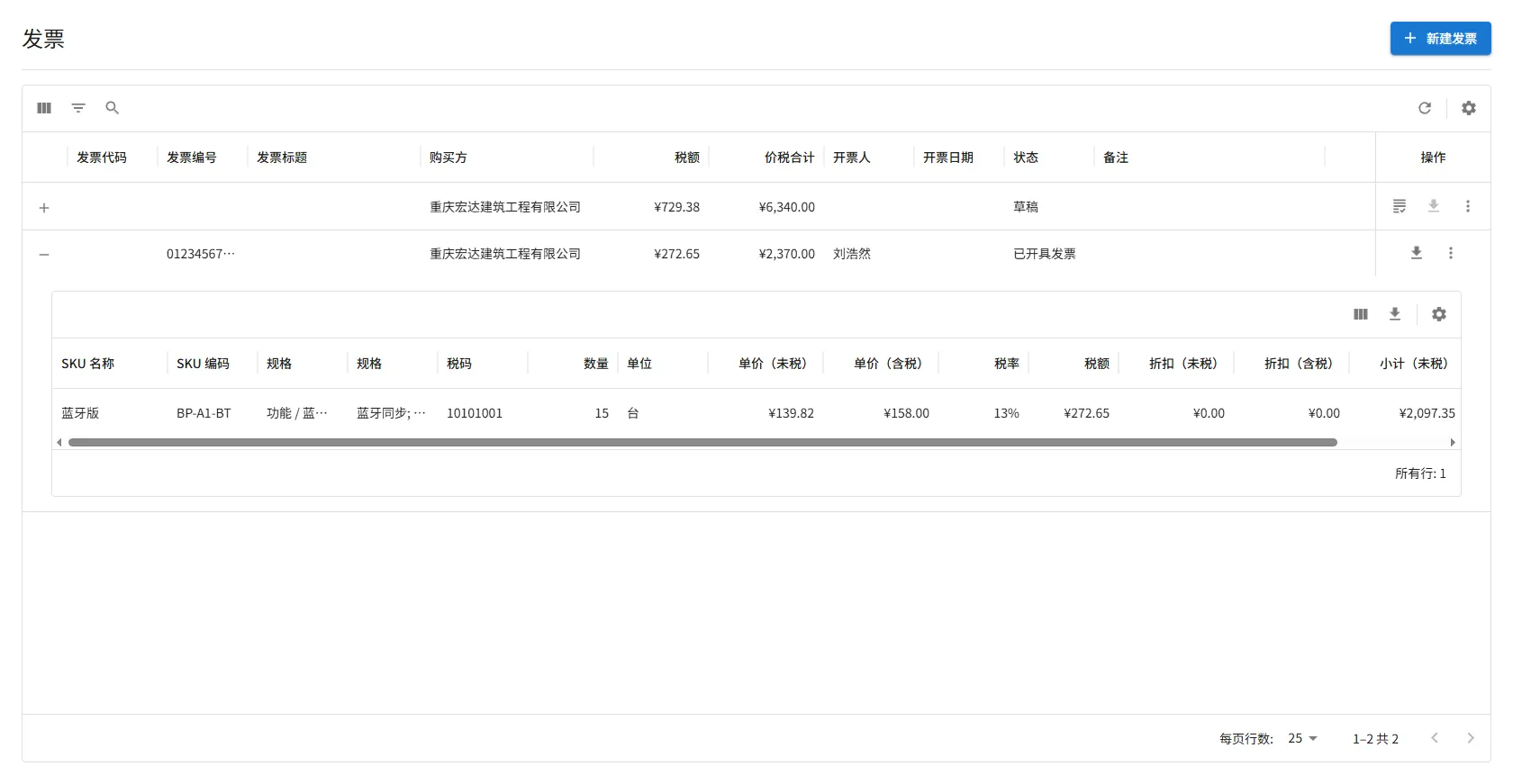
- $icon[Add]:新建发票;发票行内的为展开发票明细
- $icon[Grading]:更新发票信息,主要在发票开具后上传原件资料
- $icon[ViewColumn]:控制发票明细显示、隐藏字段
- $icon[Download]:导出发票明细,可以用于税控系统开票
为报价单、合同开具发票。
表单字段说明
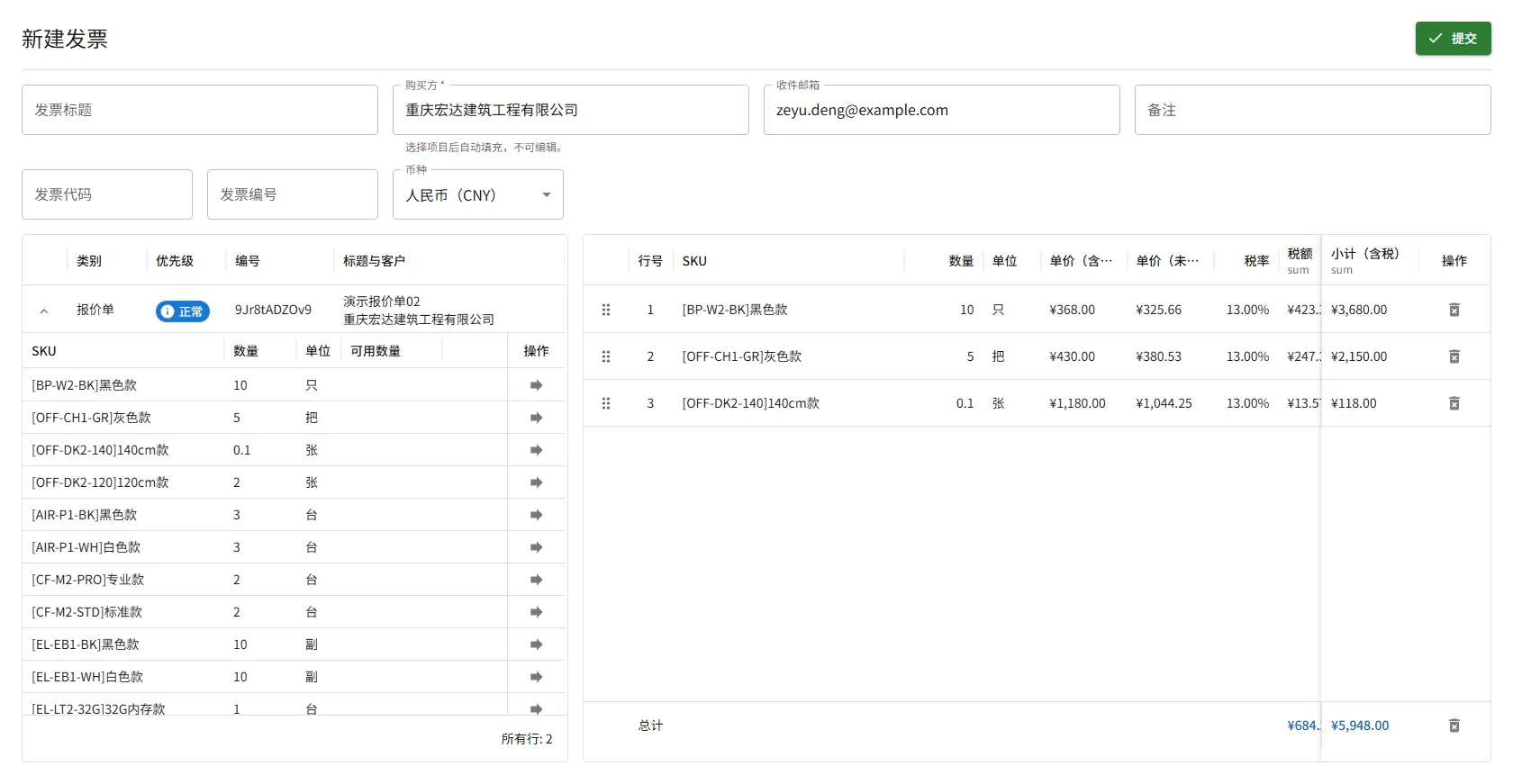
Section titled “表单字段说明”- 发票标题:用于标识和区分发票的标题信息
- 购买方、收件箱:发票接收者资料,不可编辑
- 备注:将在发票中显示的备注信息,可根据实际情况填写
- 发票代码、发票编码:可在发票正式开具后补充或更新,用于记录发票的唯一标识信息
位于表单字段下方的 左侧区域,展示所有 等待开具发票 的报价单与合同。
点击列表中任意一行的 $icon[ExpandMore] 按钮,可展开查看该单据下 尚未开票的产品列表。
操作限制
- 当您选择一份待开票的报价单或合同后,系统会锁定客户资料,只能选择 同一客户 的报价单或合同,以确保开票对象一致。
- 清空发票清单后限制解除。
位于表单字段下方的 右侧区域。
发票清单只能通过 从左侧“待开票列表”中选取项目 的方式加入,无法直接在此区域新增内容。
报价单与合同中的每个项目仅能被开具一次发票。
系统支持对整份或多份报价单或合同进行 拆分开票 或 合并开票,以适应不同客户的开票习惯。但需要注意的是:
- 系统不支持将同一个项目拆分为多次开票。
- 每个项目在第一次开票后,即视为已完成开票,不可再次对其开票。
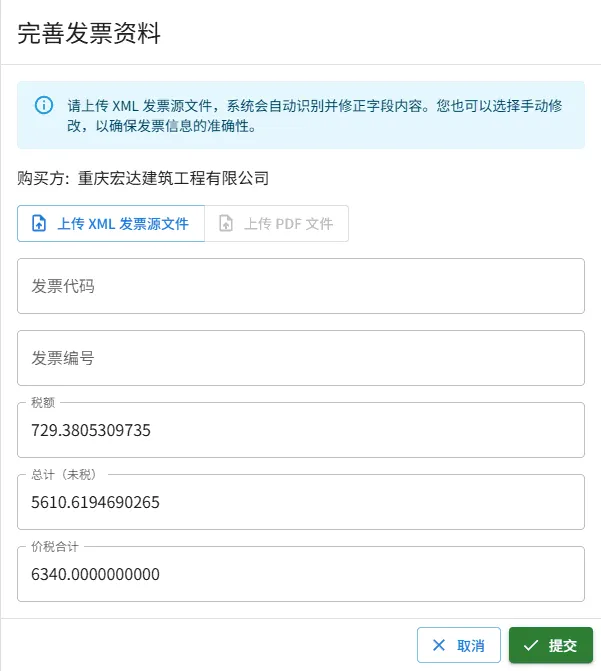
当发票成功开具后,您需要上传 发票原始的 XML 文件 以及 PDF 文件 进行留档,便于后续查询、对账与审计。
由于税控系统在计算税额时可能与系统计算的金额不完全一致的情况,需要您根据实际金额进行必要的 税额与合计金额修正。
XML 发票源文件
Section titled “XML 发票源文件”此文件包含发票原始数据,包括但不限于:详细清单、税务局信息、购销双方信息、加密信息等等。
文件可以使用 记事本 一类的文本编辑软件打开,内部数据示例:
<?xml version="1.0" encoding="utf-8" standalone="yes"?><EInvoice> <Header> <EIid>01234567890123456789</EIid> <EInvoiceTag>XXXXXXXX</EInvoiceTag> <Version>0.31</Version> <InherentLabel> <InIssuType> <LabelCode>Y</LabelCode> <LabelName>是否蓝字发票标志</LabelName> </InIssuType> <EInvoiceType> <LabelCode>01</LabelCode> <LabelName>电子发票</LabelName> </EInvoiceType> <GeneralOrSpecialVAT> <LabelCode>01</LabelCode> <LabelName>增值税专用发票</LabelName> </GeneralOrSpecialVAT> <TaxpayerType> <LabelCode>3</LabelCode> <LabelName>转登记小规模纳税人</LabelName> </TaxpayerType> </InherentLabel> <UndefinedLabel> <Label> <LabelType>发票开具方式标签</LabelType> <LabelCode>1</LabelCode> <LabelName>网页开票</LabelName> </Label> </UndefinedLabel> </Header> <EInvoiceData> <SellerInformation> <SellerIdNum>012345678901234567</SellerIdNum> <SellerName>擎闽XXXXXXX有限公司</SellerName> <SellerAddr>上海市XXXXXXXXXXXXXXX</SellerAddr> <SellerTelNum>22813685</SellerTelNum> <SellerBankName>招商银行股份有限公司上海XX支行</SellerBankName> <SellerBankAccNum>012345678901234</SellerBankAccNum> </SellerInformation> <BuyerInformation> <BuyerIdNum>012345678901234567</BuyerIdNum> <BuyerName>重庆宏达建筑工程有限公司</BuyerName> </BuyerInformation> <BasicInformation> <TotalAmWithoutTax>2097.35</TotalAmWithoutTax> <TotalTaxAm>272.65</TotalTaxAm> <TotalTax-includedAmount>2370.00</TotalTax-includedAmount> <TotalTax-includedAmountInChinese>壹万陆仟圆整</TotalTax-includedAmountInChinese> <Drawer>张三</Drawer> <RequestTime>2024-01-24 16:23:48</RequestTime> </BasicInformation> <IssuItemInformation> <ItemName>*信息技术服务*信息技术服务</ItemName> <MeaUnits>月</MeaUnits> <Quantity>1</Quantity> <UnPrice>15841.5841584158</UnPrice> <Amount>15841.58</Amount> <TaxRate>0.01</TaxRate> <ComTaxAm>158.42</ComTaxAm> <TotaltaxIncludedAmount>16000.00</TotaltaxIncludedAmount> <TaxClassificationCode>0000000000000000000</TaxClassificationCode> </IssuItemInformation> <SpecificInformation /> <AdditionalInformation /> </EInvoiceData> <SellerAuthentication> <AuthenticationMethods>01</AuthenticationMethods> </SellerAuthentication> <TaxSupervisionInfo> <InvoiceNumber>01234567890123456789</InvoiceNumber> <IssueTime>2024-01-24</IssueTime> <TaxBureauCode>01234567890</TaxBureauCode> <TaxBureauName>国家税务总局上海税务局</TaxBureauName> </TaxSupervisionInfo> <TaxBureauSignature> <Reference URI="/Einvoice/Header|/Einvoice/EinvoiceData|/Einvoice/SellerAuthentication|/Einvoice/TaxSupervisionInfo|/Einvoice/TaxBureauSignature/SignatureTime" /> <SignatureAlgorithm>1.2.156.10197.1.501</SignatureAlgorithm> <SignatureFormat>DETACH</SignatureFormat> <SignatureTime>2024-01-24 16:24:02</SignatureTime> <SignatureValue>xxxxxxxxxxxxxxxxxxxxxxxxxxxxxxxxxxxxxxxxxxxxxxxxxxxxxxxxxxxxxxxxxxxxxxxxxxxxxxxx</SignatureValue> <KeyInfo /> </TaxBureauSignature></EInvoice>PDF 发票文件
Section titled “PDF 发票文件”数字发票或纸质发票的扫描档案。
文档还在撰写中,内容暂未提供。敬请期待更新!

Copyright © 2026 TooMaker. All rights reserved.
